
(vh- keep this space!)
What is “Data Migration” for Salesforce?
In Salesforce, a Data Migration is needed when objects (standard and/or custom) and data need to be moved from one org to another. In reality this is a simplification of what’s usually required. The source org may also have automated processes, flows, reports and other things that users on the source org depend on for their business.
To provide a basic example, this document focuses mainly on the objects and the data.
Scenario
You are a Salesforce Administrator for a small but ambitious company named Alpha Enterprises. To gain a stronger position in the marketplace, the board of directors decided to buy an upstart competitor named Beta Productions. The deal was made and the competitor was acquired.
Salesforce Technical Architects determined the most cost-effective way to move forward is to move the acquired company’s SF users into our org. Ideally after the data migration is completed, each user from the acquired company will be able to do the their same work on our org.
To implement this scenario I will use two Salesforce Developer orgs: one to simulate your company’s org (Alpha Enterprises), and the other to simulate the org of the acquired company (Beta Productions).
How to do it?
Here are the essential steps.
- Identify the data that needs to be migrated.
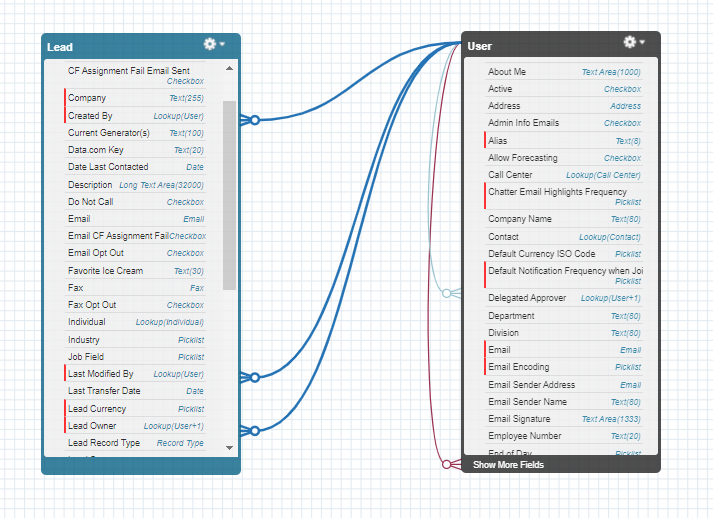
I’m going to migrate Users and Leads. Remember every Salesforce record has an owner, which corresponds to a record in the User object. From the Schema Builder view on the Beta Productions’ org I can see that there are no other objects with relationships to the Lead object, so this object is ideal for this example.
I’ll migrate Users first, then Leads.
- Create templates for the data.
I need templates for the User and Lead objects. I create an export file for each object using the Data Loader or Workbench.
NOTE: Developer orgs are shipped with only two Salesforce user licenses.
I have created a System Admin user on both orgs. This user will be the owner of the leads once they are migrated from Beta Productions to Alpha Enterprises, so I do not need a template for Users.
A standard Enterprise Edition org can have hundreds of users with different profiles, roles, and time zones. When migrating data between Enterprise edition and other orgs we use the templates to create the users on the destination org in bulk.
- Populate your templates.
(Use the ID of the System Admin account on the destination org as owner of the leads to be migrated)
When I have completed all the fields for a single record in the template, I test the data’s validity by loading that record. If the record loads successfully I can then populate the rest of the template.
- Prepare the destination org
asdfasdfasdfasdf
- Validate the data
asdfasdfasdfasdff
What’s your Budget?
Internal Resources, or Outsourced Professionals?
Data Migration Tools
asdfasdfasdfasd